Language

Summary

Language settings are split between the Admin Panel (for organisers) and the event platform (for attendees).

Admin Panel language can be overridden per user, while platform language settings control what attendees see.

There are three officially supported languages: English, Dutch, and German. French and several other languages have unofficial, partial support.

Admin Panel language

Purpose: Control the language used by users across the Let's Get Digital event platform.

Input: Single-select (Language)

Default value: English

Behaviour: Sets the language used for all Admin Panel labels, menus, and system messages. Launch Assist is also affected by this choice.

This setting affects organisers only and does not impact attendee-facing pages.

Additionally, users in the admin panel can individually choose their preferred admin panel language:
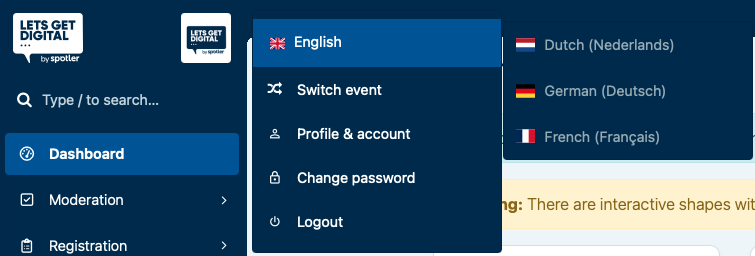
A personal language override is possible by clicking on your profile image to open the user settings.
Platform language

Purpose: Control the language used by users across the virtual event platform.

Input: Single-select (Language)

Default value: English

Behaviour: Sets the default language used for labels, menus, system messages, and content across the Event App, Virtual Event, Exhibitor Portal, Speaker Portal, and email templates.

Note: When Multi-language is enabled, this setting is used as a fallback only.

The primary event language is determined by the first language listed under Allowed languages.

Multi-language

When Multi-language is enabled, the platform can be used by users that speak different languages at the same time. To accommodate this, core aspects of the platform have been localised, such as UI elements, system alerts, and mail templates.

Content that is added to the platform can also have multiple localisations to ensure this process is as seamless as possible.

Users can also state their language preference to ensure they can read content as they prefer, but are able to switch language via the settings at any point in time.

Learn more: Multi-Language

Enable Multi-language

Purpose: Enable multi-language support across the

Input: Boolean (True/False)

Default value: False

Behaviour:

When enabled, the event can support multiple languages defined in Allowed languages.

Attendees can switch between available languages, and content can be translated per language across the event platform.

The first language listed in Allowed languages is treated as the primary (default) event language.

In order to save this setting, at least one language must be selected with the setting Allowed languages.

Allowed languages

Purpose: Define which languages are available to attendees when multi-language support is enabled.

Input: Multi-select (Languages)

Default value: False

Behaviour:

When multi-language is enabled, the selected languages determine which languages are available across the event platform.

Attendees can switch between these languages, and content can be translated per language where supported.

The first language in the list is treated as the primary (default) language of the event.

Last updated

Was this helpful?