> For the complete documentation index, see [llms.txt](https://knowledge-base.letsgetdigital.com/llms.txt). Markdown versions of documentation pages are available by appending `.md` to page URLs; this page is available as [Markdown](https://knowledge-base.letsgetdigital.com/in-person-event/app-best-practices.md).
# App - Best Practices
Use the following best practises to make sure the app work's automatically for you!
{% stepper %}
{% step %}
### Navigation setup
**Tab 1: Home (Combined Start page)**
* My ticket
* Swipe-2-match
* Programme
* Companies
**Tab 2: Chat**
**Tab3: Connection Centre**
**Tab 4: Notifications**
**Tab 5: Menu**
* Floor plan
* Appointments
* My Contacts
* More\
\- Activities\
\- Leave a review\
\- Settings
* About the App
{% hint style="info" %}
**Tip:** Use all 5 available tabs to minimize the number of clicks for users. On the Home page, only assign 4 sub-menu tabs to ensure the social wall content remains visible and prominent.
{% endhint %}
{% endstep %}
{% step %}
### **Social wall encouragment**
Place a non-pinned message (as the organisation) promoting your attendees to make their first social wall post.
{% hint style="success" %}
*\*Here is an example social wall post with a proven track record to boost social wall engagment:*\
\
*Final preparations are underway for the event and we are very excited to welcome you! Let us know if you are excited as we are by posting on this social wall.*
*See you soon!*
{% endhint %}
{% hint style="success" %}
\*Extra booster: Get at least one colleage to reply or post on the social wall.
{% endhint %}
{% endstep %}
{% step %}
### Scheduled e-mails
{% hint style="info" %}
**Note:** During the **Content Ready** meeting, we'll add the recommended email templates to your LaunchAssist project together. You'll then have time to review and edit the content before the **Onboarding** meeting, where we'll schedule all emails together and make any final adjustments.
{% endhint %}
#### **Exhibitor emails to schedule**
| Name of mail | When to schedule | Send emails to users who have | Tags | Recipient state |
| ---------------------------------------- | --------------------------------- | --------------------------------- | ----------------- | ------------------------------------------------------------------------------------- |
| Exhibitor portal invite | 30 days prior to event start date | At least one of the selected tags | Exhibitor manager | Send to everyone |
| Exhibitor portal reminder | 14 days prior to event start date | At least one of the selected tags | Exhibitor manager | Only send to exhibitor managers who have not yet logged into the Exhibitor portal yet |
| Exhibitor invite to app | 17 days prior to the event | At least one of the selected tags | Exhibitor | Send to everyone |
| Exhibitor reminder to ap | 7 days prior to the event | At least one of the selected tags | Exhibitor | Only send to users who didn't login yet |
| Exhibitor final reminder to login to app | 1 day prior to the event | At least one of the selected tags | Exhibitor | Only send to users who didn't login yet |
#### **General event emails to schedule**
| Name of mail | When to schedule | Send emails to users who have | Tags | Recipient state |
| --------------------------------------- | ---------------------------------------------------------------- | ----------------------------------------------------------------- | --------- | --------------------------------------- |
| Attendee invite to app | 14 or 7 days prior to event start date | Exclude with the selected tags | Exhibitor | Send to everyone |
| Attendees invite reminder to app | 5 days after first invite | Exclude with the selected tags | Exhibitor | Only send to users who didn't login yet |
| Attendee final reminder to login to app | 1 day prior to event start date (only for 14 day prior invitees) | Exclude with the selected tags | Exhibitor | Only send to users who didn't login yet |
| Export Contacts | 1 day after event end date | Only send to users who logged in and have at least one connection | | Send to everyone |
{% endstep %}
{% step %}
### Feedback / Net promoter score (NPS)
Enable automatic session feedback pop-ups at the end of each session
* Enable automatic session feedback pop-ups at the end of each session
* Schedule an NPS push notification (this gives your event a general score)\
(1 hour before the event stops)
* Schedule 1 general feedback question about the app. (2 hours before the event stops)
{% endstep %}
{% step %}
### Warm-up push messages
Warm the audience, with some scheduled push messages.
| Moment | Content example |
| ------------------------ | ------------------------------------------------------------------------------------------------------------------------------------------------------------------------------------------------------------------------------------------------------------------------------------------------------------------------------------------------------------ |
| 2 days before the event | Get connected with the other attendees. Have a look in the connection centre to see what brings them to the event, or use the swipe-2-match module. |
| Evening before the event | Tomorrow the event starts! We are looking forward to it. You as well? Let us know in the Social Feed |
| Moment check-in opens | The check-ins is just opened. We are looking forward to see you soon! |
| After each day | Day **XXX** is closed. We hope to see you tomorrow |
| After final day |
The event is over. Hopefully you've made very great connections and get inspired with new knowlegde. If you've made connections using this application you will automatically receive an e-mail with a link to your contacts.
Use this application to connect to the people you've missed or as a contact book for all your relevant contacts.
|
| {% endstep %} | |
{% step %}
### Matchmaking
* Create 10 to 15 relevant matchmaking tags.
* Encourage users who have not yet highlighted their personal interest to set them by placing an action button on the social wall \
App settings -> Netoworking bubble -> '**Encourage users to set their matchmaking tags on the social wall if not yet filled**'\

* Set-up automatic matchmaking rounds with 2 connections made each round. \
(1 time 1 day before the event + 1 time 30 min before the events opens)
{% endstep %}
{% step %}
### Appointments
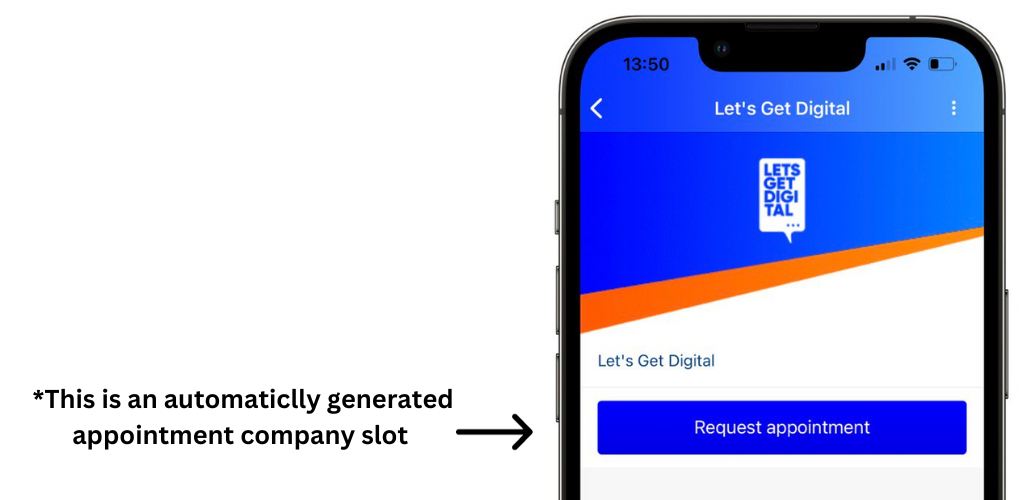
Make it easier for your attendees to schedule appointments with your Exhibitors by choosing to automatically generate appointment slots for companies.
Enable in 'Settings' -> 'App settings' -> 'Networking bubble' -> '**Generate Automatic Appointment Slots for Companies**'
{% endstep %}
{% step %}
### Make sure all 'App content' is filled
Before attendees are onboarded to the App make sure everything is filled and looking good!
Areas too watch out for:
* **Companies profiles** - has the company filled their company information and set a nice logo?
* **Speaker and Exhibitor profiles** - Have these users got a description, relevant contact information and a profile picture?
* **The programme** - Does every programme have a image, description, location and relevant speakers/ exhibitors connected to it?
{% endstep %}
{% endstepper %}
---
# Agent Instructions
This documentation is published with GitBook. GitBook is the documentation platform designed so that both humans and AI agents can read, navigate, and reason over technical content effectively. Learn more at gitbook.com.
## Querying This Documentation
If you need additional information that is not directly available in this page, you can query the documentation by asking a question.
Perform an HTTP GET request on the following URL with the `ask` and `goal` query parameters:
```
GET https://knowledge-base.letsgetdigital.com/in-person-event/app-best-practices.md?ask=&goal=
```
`ask` is the immediate question: it should be specific, self-contained, and written in natural language.
`goal` is what the user is ultimately trying to achieve, the reason they need the answer. Sharing it helps GitBook give you a better, more relevant answer. A goal is most helpful when it describes the outcome the user wants rather than restating the question. For example, with `ask=how do I create an API token`, a goal like `automate deployments from our CI pipeline` lets GitBook tailor the answer to that use case.
The response will contain a direct answer to the question and relevant excerpts and sources from the documentation.
Use this mechanism when the answer is not explicitly present in the current page, you need clarification or additional context, or you want to retrieve related documentation sections.
.png?alt=media&token=f69ef4f4-7888-43ba-9b77-90abee81836c)
.png?alt=media&token=42bd94b8-bf3b-4e40-9667-3ae2350206e9)
.png?alt=media&token=ea677264-ecb8-406e-aec9-9598f2c3932f)
.png?alt=media&token=e16d4b0b-4987-4b3d-8121-f7fab4bc6ae1)