# Branded Check-in Stations

### Benefits

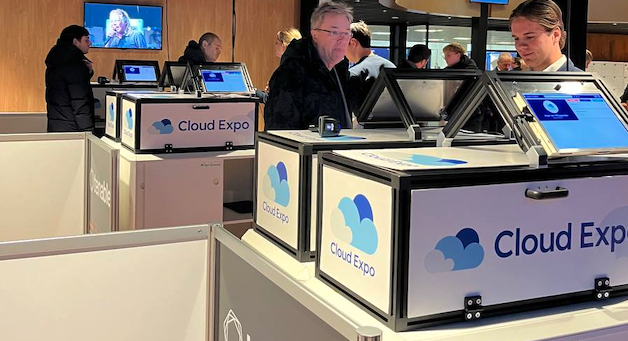
<figure><img src="/files/cCQLaAmRZ0RyXPIHfrsO" alt=""><figcaption><p>Custom design cases used at CloudExpo</p></figcaption></figure>

Custom branding for your check-in stations offers two major benefits:

**1. Great first impression**\
A well-branded check-in station enhances the overall look of your event. First impressions matter, and a professionally designed station ensures your brand is clearly represented from the moment attendees arrive.

**2. Increased Sponsorship Visibility**\
If you have event sponsors looking for more exposure, custom branding offers an excellent opportunity. By featuring their logo, message, or even a QR code on the station, sponsors gain additional visibility and engagement.

### More information

* Setup Cost (€250 per check-in station)
  * We handle everything: from preparing the design to implementation.
  * If used for sponsors. Our client usually sell this branding for 300 euro per station to Exhibitors. This means happy exhibitors without costs and an (even) better check-in!&#x20;
* QR Code Integration
  * You can add a QR code to your design, allowing attendees to scan for more information, downloads, or engagement.
* Design Assistance (€65)
  * If you need help with the design, we can create a Look & View version for you. No design skills are needed

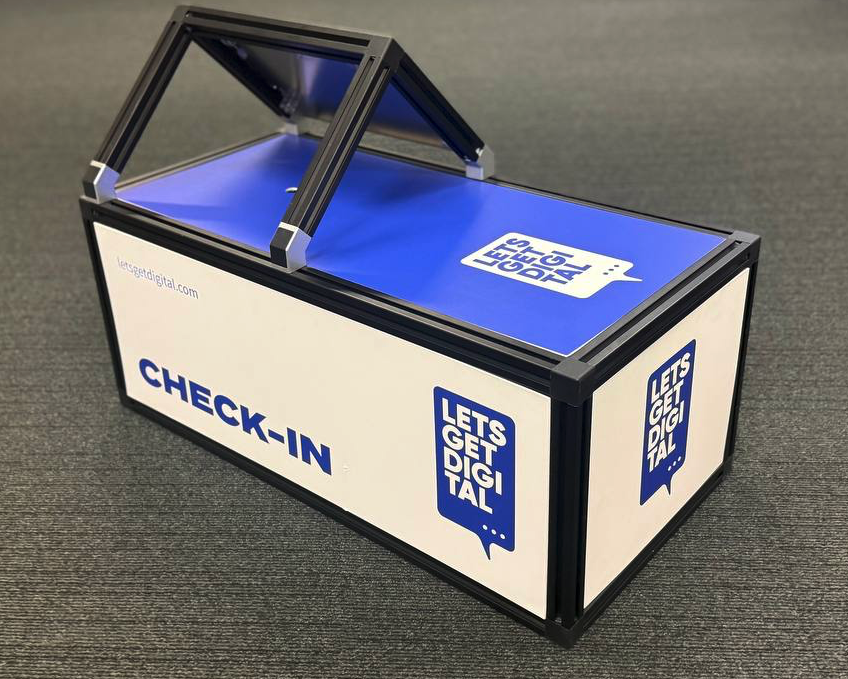
<figure><img src="/files/gddkfnYuVTATz3eX2ho6" alt=""><figcaption><p>Example of the LGD Design</p></figcaption></figure>

### Design Specifications

Each check-in station consists of four separate branded panels:

<table><thead><tr><th width="179">Name</th><th width="201">Size</th><th>Holes</th></tr></thead><tbody><tr><td>Large Side A</td><td>75cm x 28cm</td><td>Holes for the door</td></tr><tr><td>Large Side B</td><td>75cm x 28cm</td><td></td></tr><tr><td>Top Side</td><td>75cm x 34cm</td><td>A 20mm hole will be placed in the middle of the shortest side (50%) and at 25% of the longest side.</td></tr><tr><td>Small Side </td><td>34cm x 28cm</td><td></td></tr></tbody></table>

### **Design Submission Guidelines**

* Send the design files to: <support@letsgetdigital.com>
  * We either need 4 PDF files; or 4 AI files
  * If you deliver them as PDF; make sure to include a 3mm bleed in your design files while exporting.
* You must submit your final design at least 10 days before the event.
* Each panel should be submitted separately in Illustrator (.AI) format orr as a PDF preview.<br>

### Supporting files

{% file src="/files/8QBO28dihB9F2N5OnQya" %}

{% file src="/files/JSJXpsKHmlz6G6lX0sK6" %}

{% file src="/files/f45E6sdA4vsPuZ17IEet" %}

{% file src="/files/pRmORCv9NnRcAVOlqwQX" %}

{% file src="/files/JQzkdj33A0dZX09cBjNI" %}

{% file src="/files/otrGAzGe81v6eYnZsB1h" %}

{% file src="/files/b8Vh7SOrjuIi3vdnktcL" %}

{% file src="/files/ZhhHHXBJSZx6nTyRC8iG" %}


---

# Agent Instructions: Querying This Documentation

If you need additional information that is not directly available in this page, you can query the documentation dynamically by asking a question.

Perform an HTTP GET request on the current page URL with the `ask` query parameter:

```
GET https://knowledge-base.letsgetdigital.com/badge-printing/branded-check-in-stations.md?ask=<question>
```

The question should be specific, self-contained, and written in natural language.
The response will contain a direct answer to the question and relevant excerpts and sources from the documentation.

Use this mechanism when the answer is not explicitly present in the current page, you need clarification or additional context, or you want to retrieve related documentation sections.