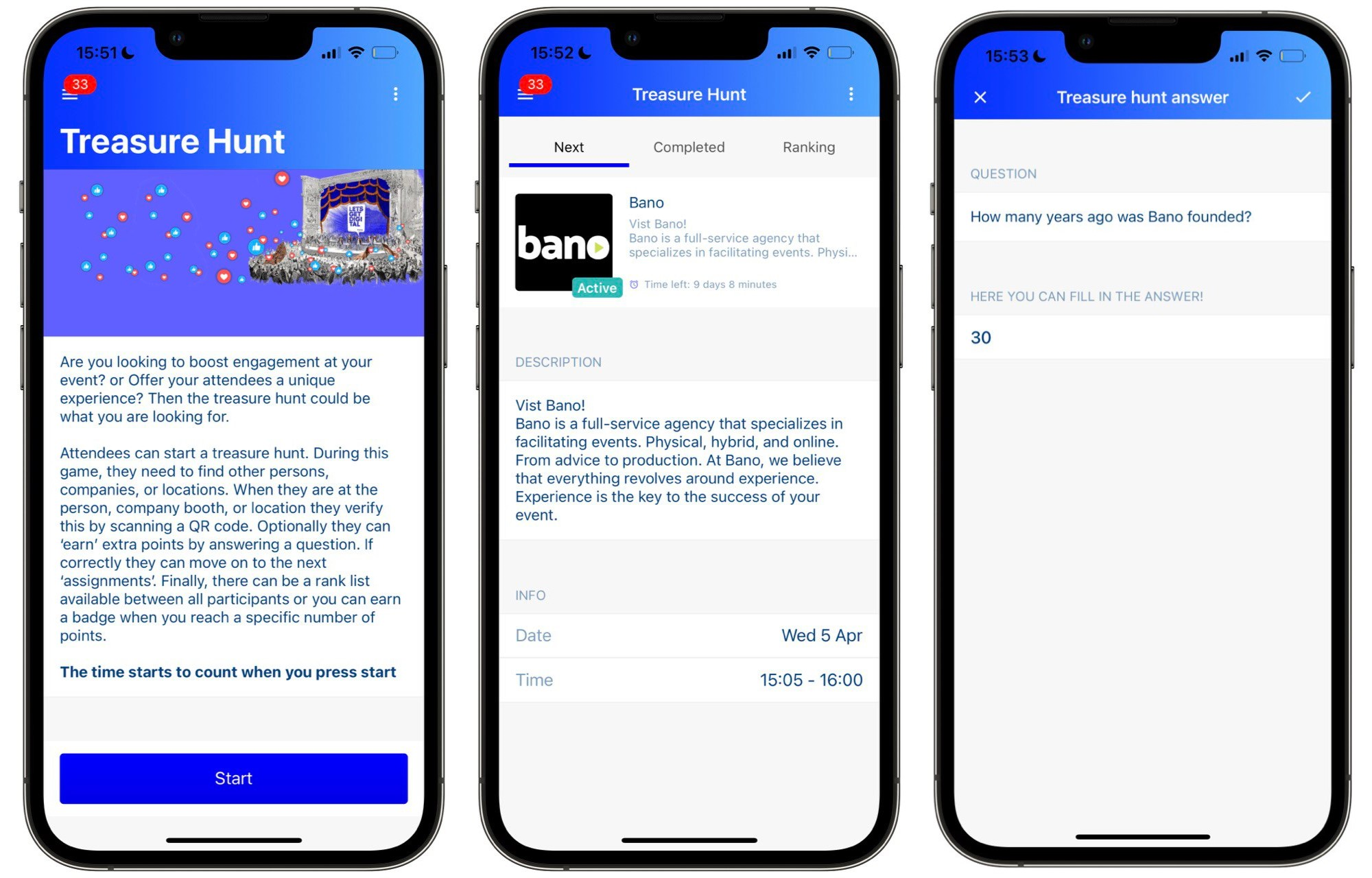
# Treasure hunt

### How the Treasure Hunt works

The Treasure Hunt is flexible enough to fit any event format. You can use it to draw attention to key locations, exhibitors, speakers, or programme highlights — wherever you want to direct your audience.

Attendees access the feature directly from the app's navigation. From there, they're guided to scan a series of QR codes placed around the event. Each scan unlocks a question tied to that specific area, and correct answers earn points. A live leaderboard keeps the competition friendly and the energy high throughout the day.

<figure><img src="/files/In5wivK33z09dCLVN4JM" alt=""><figcaption></figcaption></figure>

## How to set up a treasure hunt

You can set up treasure hunts from within the Admin panel by completing the steps listed below:&#x20;

1. Open the Admin panel&#x20;
2. Go to the 'WOW-effects'
3. Choose 'Treasure hunt'
4. Click on '+ New hunt'
5. Fill in the Treasure hunt details (please use the table below for reference)
6. Click 'Save'
7. Once you have created a treasure hunt, you can duplicate it.&#x20;

{% hint style="info" %}
**Important:** you will need to add the treasure hunt to the apps navigation for it to be visible. Once you have added the treasure hunt to the app, you can start testing it. Note that you can only test it, when the treasure hunt is not live.
{% endhint %}

| Field                                               | Description                                                                                                                                                                                                                                                                                                                                                                                                                                                                                                                                                                                                                         |
| --------------------------------------------------- | ----------------------------------------------------------------------------------------------------------------------------------------------------------------------------------------------------------------------------------------------------------------------------------------------------------------------------------------------------------------------------------------------------------------------------------------------------------------------------------------------------------------------------------------------------------------------------------------------------------------------------------- |
| Hunt order                                          | <p>Choose from the following options:<br></p><ul><li><strong>All entries visible</strong><br>All treasure hunt questions are available to answer in any order.</li><li><strong>One entry visible random order</strong><br>The user is shown one question at a time to answer in chosen at random.</li><li><strong>One entry visible custom order</strong><br>The user is given one question to answer at a time in a custom sequence.</li><li><strong>One entry visible custom order with random start</strong><br>The user is given one question to answer at a time in a custom sequence but with a random start time. </li></ul> |
| Missing Hunt image                                  | If the Company, Location or User image is not set this will be the default image.                                                                                                                                                                                                                                                                                                                                                                                                                                                                                                                                                   |
| Info                                                | List here info about your treasure hunt which will appear before the hunt starts.                                                                                                                                                                                                                                                                                                                                                                                                                                                                                                                                                   |
| Info image                                          | The image that will appear before hunt stats.                                                                                                                                                                                                                                                                                                                                                                                                                                                                                                                                                                                       |
| Allow skipping entry                                | Allows users to skip a question                                                                                                                                                                                                                                                                                                                                                                                                                                                                                                                                                                                                     |
| Show ranking in App                                 | Allows users to see the Treasure hunt ranking.                                                                                                                                                                                                                                                                                                                                                                                                                                                                                                                                                                                      |
| Send push notification when entry is expired.       | Sends a push notification to users when the question has expired                                                                                                                                                                                                                                                                                                                                                                                                                                                                                                                                                                    |
| Send push notification when push entry is available | Sends a push notification to users when a new question is available                                                                                                                                                                                                                                                                                                                                                                                                                                                                                                                                                                 |
| Points for entry scan                               | Give points to users for scanning a QR                                                                                                                                                                                                                                                                                                                                                                                                                                                                                                                                                                                              |
| Points for correct answer                           | Set the points the users will receive for answering a question correctly                                                                                                                                                                                                                                                                                                                                                                                                                                                                                                                                                            |
| Point for skipping entry                            | Set the points the users will receive for skipping a question                                                                                                                                                                                                                                                                                                                                                                                                                                                                                                                                                                       |
| **Adding a question**                               | To add your first question click on the **+** symbol                                                                                                                                                                                                                                                                                                                                                                                                                                                                                                                                                                                |
| Hunt for                                            | Choose the **Company**, **User** or **Location**                                                                                                                                                                                                                                                                                                                                                                                                                                                                                                                                                                                    |
| Description:                                        | Give a description or provide a clue to where users can find the question.                                                                                                                                                                                                                                                                                                                                                                                                                                                                                                                                                          |
| Question:                                           | Type the question the user must answer                                                                                                                                                                                                                                                                                                                                                                                                                                                                                                                                                                                              |
| Answer(s):                                          | Type the answer to the question and click **Enter** to save                                                                                                                                                                                                                                                                                                                                                                                                                                                                                                                                                                         |
| Start time:                                         | Set an optional start time to when the question can be answered                                                                                                                                                                                                                                                                                                                                                                                                                                                                                                                                                                     |
| End time:                                           | Set an optional end time to when the question can be answered                                                                                                                                                                                                                                                                                                                                                                                                                                                                                                                                                                       |
| Image                                               | Upload an image (recommended dimensions: 400x400)                                                                                                                                                                                                                                                                                                                                                                                                                                                                                                                                                                                   |
| Video                                               | Set a video with a maximum of 50mb                                                                                                                                                                                                                                                                                                                                                                                                                                                                                                                                                                                                  |

### Treasure hunt QR codes

Each QR code needs to be physically displayed in the area it's linked to, so attendees can scan it and unlock the corresponding question. You can download and print all your QR codes directly from the Admin panel:

1. Open the Admin panel
2. Go to **WOW-effects**
3. Select **Treasure Hunt**
4. Click the edit icon on the relevant Treasure Hunt
5. Click **Print QR Codes**
6. A PDF containing all QR codes for that Treasure Hunt will open in a new tab

### Where to find the Treasure Hunt statistics

Head to the Statistics section to view both the rankings and a full breakdown of participant answers.

![](/files/HzHijyO9s5Gq5FmRG5BO) **Ranking**

| Name   | Description                                                                                                                                     |
| ------ | ----------------------------------------------------------------------------------------------------------------------------------------------- |
| Rank   | This shows the ranking, with 1 being the person that won and thus filled in the treasure hunt the fastest while also receiving the most points. |
| User   | First name and last name of the user.                                                                                                           |
| Email  | E-mail address of the user.                                                                                                                     |
| Points | The number of points that the user has received.                                                                                                |
| Time   | The time it took for the user to complete the treasure hunt.                                                                                    |

![](/files/zWsEwnNlmmZSYpRYqqaG) **Answers**

| Name     | Description                                                       |
| -------- | ----------------------------------------------------------------- |
| User     | First and last name of the user                                   |
| Email    | E-mail address of the user                                        |
| Question | The question asked for the treasure                               |
| Answer   | The answer provided by the user for the question of the treasure. |
| Time     | How long the user took to answer the question                     |


---

# Agent Instructions: Querying This Documentation

If you need additional information that is not directly available in this page, you can query the documentation dynamically by asking a question.

Perform an HTTP GET request on the current page URL with the `ask` query parameter:

```
GET https://knowledge-base.letsgetdigital.com/the-admin-panel/networking/treasure-hunt.md?ask=<question>
```

The question should be specific, self-contained, and written in natural language.
The response will contain a direct answer to the question and relevant excerpts and sources from the documentation.

Use this mechanism when the answer is not explicitly present in the current page, you need clarification or additional context, or you want to retrieve related documentation sections.